On Purpose Productions detached garage studio

Started by onpurposeproductions on 10 December 2008. 282 replies, 2008–2014. In the Library under Build diaries. Key posts in this thread.

Originally posted at johnlsayers.com, topic 11485.

Thanks Ro! Of course....I should probably allow for the option of powered or passive monitors since they're not confirmed. I'll confirm with my electrician that two more outlets won't be a big deal and probably run some speaker cable as well. You lost me with this line though:
Ro wrote:
XLR doen't carry any mains so.. gheh.
I've started wondering whether or not I need to bothering putting up vapor barrier. My building inspector didn't think it would be a big deal if I didn't because of the double wall/ceiling design but also implied that I may as well. My HVAC guy certainly thought the mini-split will do a really good job at controlling humidity levels and didn't think vapor barrier would be missed either.... Since acoustically I'd probably be better off without it I'm wondering......Any thoughts on that for my southern Ontario climate?
onpurposeproductions wrote:
You lost me with this line though:
Ro wrote:
XLR doen't carry any mains so.. gheh.
Must be the language barrier. What I mean is that XLR wires (and I'm purely talking audiocables here) are not for powering monitors or anything like that. They only carry the audio signal.
Ro wrote:
What I mean is that XLR wires (and I'm purely talking audiocables here) are not for powering monitors or anything like that. They only carry the audio signal.
Ahh - gotcha! Hopefully it'll be no problem to put in a couple more outlets right at the main monitor position. Also - that ethernet run that I put in from the CR to the equipment closet to network my computers - I thought it was a crossover cable but its not. I'll be replacing it hopefully in the next couple days. My glass should be ready any day now and my doors are ready for pickup at HD so I'm going to be busy! I've been able to get discounted pricing on most of my materials purchases so far, which I'm pretty pleased about. I've got most of my stuff at Lowe's but went to HD for insulation as Lowe's doesn't carry Roxul. It turns out the store manager has his own video production business on the side and was more than happy to offer me 10% off the insulation! :wink: (they say HD doesn't negotiate prices...) Despite all the discounts personal finances are quite a bit tighter than my wife and I had anticipated due to various circumstances. I'm feeling the pressure to get it done ASAP so it can earn money instead of eating it! Thankfully, there are projects lined up for when its completed!
Regarding vapour barrier... I'm not an expert by any stretch of the imagination, but I would think that any time you can prevent moisture from coming in contact with the paper on your drywall, you're going to want to do it. Mold loves to eat paper. And anytime you have a warm interior air of a building meeting the cold exterior air, you're going to have vapour. Doesn't matter how many layers of drywall you put up. But, I'm just an IT guy. Not a builder... My two cents. Andy
Thanks Andy! I've always thought that the room-within-a-room design shouldn't have any impact on the necessity of vapor barrier but the mini-splits control of humidity levels did seem like a valid point.... As far as paper on the insulation - there isn't any. These are open-faced Roxul Safe-n-Sound bats - nothing on either side. And they're also moisture/mold resistant. The studs on the other hand could probably grow mold nicely. The other consideration is from an acoustical standpoint I'd probably be better off without the vapor barrier.....
I was pretty sure you were using the Roxul all around. Good to know that you don't have the paper-backed stuff. If I remember correctly, Rod's advice was to remove the paper anyway. The paper I was actually talking about was the paper on the drywall. :) You raise an interesting point about the minisplits, but I would think that if you've sealed everything properly then the minis would only help with the humidity inside the rooms, and not with the space between the rooms/outer walls. I can't point you to any exact discussions on here, but my memory tells me that Rod's advice is that you always need the barrier, and that you have to make sure that you place it in the correct location. I'm having a hard time understanding your statement "from an acoustical standpoint I'd probably be better off without the vapor barrier....." Where would the acoustics degrade when you use vapour barrier? If I've missed something in your build, I apologize. Are you building inside-out walls? I don't think you are, correct?
Aha... I've found the post from the man himself, Rod Gervais. viewtopic.php?f=2&t=11636&p=84984#p84984 Tells you where to install, and even address some of the "acoustic" questions. Hopefully it provides all the answers for you. Andy
snowdog99 wrote:
I'm having a hard time understanding your statement "from an acoustical standpoint I'd probably be better off without the vapor barrier....." Where would the acoustics degrade when you use vapour barrier? If I've missed something in your build, I apologize. Are you building inside-out walls? I don't think you are, correct?
No inside out walls. I was just thinking that any sound that transmits through my two layers of drywall (on the finished interior) would then potentially be reflected by the vapor barrier rather than absorbed directly into the roxul.....but perhaps the impact of that would be so incredibly minimal that its not really a consideration? Especially since it would only be high frequencies that would reflect off the stuff. At any rate - I'm certainly feeling like I'll continue with my original plan and put it up like I more than likely should.
I think you`re on the right course my friend. I`ve been reading a lot and I can`t remember ever reading a post by someone saying `man, I wish I hadn`t installed that vapor barrier because now my acoustics are all off.` Its really all about stopping the low frequencies anyway, as the high frequencies tend to bounce around the rooms... then you get into the diffusers etc, which is a whole other best unto itself. :D I think that your construction looks great, keep at it!
snowdog99 wrote:
`man, I wish I hadn`t installed that vapor barrier because now my acoustics are all off.`
:lol:
snowdog99 wrote:
I think that your construction looks great, keep at it!
Thanks a lot for the encouragement! I'm certainly committed to seeing it through at this point. I can't tell you how anxious I am to set up my drums in that live room! :shot: And there's a jazz project just waiting to get produced.
I just started wondering whether or not I actually want the in-wall cat5e wiring to 'crossover' or if it should actually just wire up straight through (pin 1 to pin1, pin2 to pin2, etc). After some research, it seems that most people recommend in-wall cat5e to ALWAYS be wired up straight through, while using a crossover patch cable on one end or the other for cross talk. Makes sense. I also didn't really think about the fact that the only difference between a standard cat5e and a crossover cable is how its wired.....and since I'd be wiring it up...... :roll: :oops: I've got it figured out now - that's the main thing! :) My electrician also confirmed that it wouldn't be a problem to add a couple more electrical outlets post-inspection so I put those in. I've already installed about 3/4 of the insulation and this means I can get the rest in probably today. :) I'll get some pics up once the insulation is all in. Glass for the windows arrives Friday!
What's the cat5e/6 going to be used for? Apologies again if I've overlooked that portion of your build. Andy
snowdog99 wrote:
What's the cat5e/6 going to be used for? Apologies again if I've overlooked that portion of your build.
My Pro Tools computer (G5) will be in my equipment closet while I'll have an iMac out in the control room - I'm setting up a port in both locations so that I can network the two machines for file transfers.
Ah, ok. Gotcha. How about this? Bring the cat5 from your house into the machine room, plug it into a 4 port switch. Then plug an output of the switch into each system. No crossovers to worry about- switches do it all intelligently. And if you want to make it look really pro, I've got a 12port punch down panel that I could donate to the cause that you could install, and then you can plug straight into each location if you like. Yours for the low price of shipping it there. I think it would all work as your cat5e back to the house is plugged into a wireless router? If so, then in combo with the switch, any computers you plug in will all get addressed dynamically (unless you reconfigured the router from default), and they should all see each other nicely. Added bonus would be the shared internet of course. Of course, I could just be making this a lot more complex than you ever wanted. But from the "techy-geek" cool side of things... well, 'nuf said. What say you? Andy
Hey Andy, Thanks a lot for the offer on that punch down panel! It is more than I need though so i probably won't take you up on it. This is the situation: I did run a cat5e cable from my dlink dir-655 wireless router (in the house) through some conduit that I installed early in the build. At the time of installation I was planning on my equipment room being on the west side of the studio/garage so that's where the cable runs to. However, I since changed my layout so that the equipment room is on the east side of the building. It works out okay because my iMac (internet machine) will be located right where that cat5e cable comes in (west). I'll be terminating that run from the house to a wall plate port so that I can use a short patch cable from my iMac to achieve a wired internet connection. So what I'm doing now is setting up another wall plate port at the iMac location (west) which connects to a wall plate port in the equipment room (east). And I seem to have run into a problem; I terminated each end of the cable to the respective ports and patched a computer into each end (one with a standard cat5e patch and the other with a crossover patch) to see if I could get them communicating. Sometimes my iMac will find the other computer (an old G4 laptop) but usually can't make a connection. And once or twice it actually did make a connection but only very briefly. It seems like the signal is weakened to an unusable degree. Any idea why? There shouldn't be any interference yet since no electrical or anything else is hooked up. Could it be the wall plate connectors are cheap and not making a good connection? If I connect straight from computer to computer via the short crossover patch cable there's no problem. Barrie, eh? You're just up the road! - Greg
Hmm... that's a dilly of a pickle. I'm a Microsoft guy by trade, but will be making the switch to Mac when I'm done building my own studio (hopefully later this year). So, I'd be glad to help you out if I can. As you say, it works when you plug the two straight together, so it's gotta be in the cabling or punch downs somewhere. Found a couple of interesting articles in the Mac support area, the least of which is that you may not have to even use a crossover cable. According to this: http://support.apple.com/kb/HT2274 a Powerbook G4 or later has the ability to auto-detect the connection type and make the necessary "switch," so it shouldn't matter what type of cable you use. You were right to wire the wall plates as straight through tho. Speaking of wiring- the punch downs will have two different standards you can follow- the "T568a" standard and the "T568b" standard. Do you know which one you followed? Hopefully, you followed the "a" standard which will be (from left to right) 1-green/white, 2-green, 3-orange/white, 4-blue, 5-blue/white, 6-orange, 7-brown/white, 8-brown. This is what a standard straight through cable will expect to connect to (at least, this is how my entire 100+ computer law office is wired. Seems to work really well). I'm not sure what the "b" standard is for, except to confuse everyone that uses the "a" standard. :) So, to answer another couple of questions. From your post, you say it's about 100 ft from the house to the panel in the garage. By cat5e standards, you should be able to go 300ft without having to incorporate some type of repeater. So, big check mark on the length of run. Unless the cable was cheap and broke somewhere along the way when you pulled it, that piece should be fine. Now, inside the studio. Again, length of run between machine room and control room shouldn't be an issue. You've done a great job at narrowing down the issue as you've already done the "do the computers see each other when plugged directly together" test. So, I'm pretty sure that the situation exists either in the cable or punch downs. "D'uh, I already told you that." I can tell you that the cabling company I use for the office sure wouldn't go out and spend a lot on buying the plugs for the wall plates, but that we have had issues where they didn't punch things down properly. They pulled the end off, re-punched it and voila problem solved. I'm assuming that there are no kinks in the run between rooms, right? I'm also assuming you've got all the TCP/IP settings correct on both machines. I imagine if you didn't they wouldn't play well together when plugged directly together, right? Of course, if you look at that last sentence, and say "What the eff are you talking about Andy?" that may also be the issue. :D Going back to my original idea, you could install a switch at the punch down (on the run from the house) and then plug each system into the switch. They would then get their TCP/IP settings from your router, should make them see each other reliably, and the switch would boost the signal and provide internet access to both systems. You wouldn't have to be changing the cable on the back of your studio system every time you wanted to go get some system updates or something. Looked it up at Future Shop, an 8port Cisco goes for less than $50 these days. If you can wait, they usually go on serious rebates in the next couple of weeks as the school year gets started. Depending on how far up the road I am from you, I'd be glad to grab my testers etc and scoot down to help you if I can. Send me a PM and we'll work out the details if necessary. Andy
snowdog99 wrote:
Speaking of wiring- the punch downs will have two different standards you can follow- the "T568a" standard and the "T568b" standard. Do you know which one you followed? Hopefully, you followed the "a" standard which will be (from left to right) 1-green/white, 2-green, 3-orange/white, 4-blue, 5-blue/white, 6-orange, 7-brown/white, 8-brown. This is what a standard straight through cable will expect to connect to
Thanks for the thoughts Andy. After reading through that I'm sure my wiring is the most likely cause of the problem. The punch down wall plate's cabling were all solid colors so I couldn't simply match up conductor to conductor by color. I really just made sure that they were wired up the same on both ends - I matched up the solid colors (green to green, brown to brown, etc) and then randomly assigned the rest (green/white to solid red on punch down, orange/white to black on punch down, etc) Shouldn't it only matter that they match on either end? How do I follow the standard if the punch down uses all solids? All the settings are good to go on the computers - I've had them networked in the house for some time. There aren't any kinks in the cable run (although I'll double check).
Here's a pic of the back of the wall plate. Pin 1 would be on the far left, is that right? I'm going to re-terminate the cables and wrap the stranded wires all the way around the screw. Maybe they're just not conducting well.... Would it be worth tinning the strands with solder?
Image not preserved: cat5e_wall_plate.jpg
Hmm... that's a confusing thing for sure. Guess I shouldn't have assumed anything. :D Do you have a manufacturer name for this plate? Personally, because this seems too likely to have issues, I would take those back and get one of these:
Image not preserved: data.jpg
And then get the appropriate wall plate. Leviton makes this particular one. It will come with the appropriate punch down tool, and as you can see has the colour coding right on the connector. This pic I got off the Home depot site, cost was $6/connector and a couple of bucks per wallplate. Using this style connector, you may be able to eliminate one of your boxes as well- run your cable from your machine room into the back of the wall box that has your run from the house, get a dual connector plate, voila. One less penetration through your control room wall. My 2 cents. Let me know your thoughts. Andy ps. forgot to answer your other questions- cat5e standards indicate that the pairs must follow this outline: pin1, pin2, pin3, pin6, pin5, pin4, pin7, pin8. They have that little "flip" to prevent the Transmit pair from connecting to the Transmit pair on the other end. If you wire p1-p1,p2-p2,p3-p3,p4-p4,p5-p5,p6-p6,p7-p7,p8-p8 you'll end up with data collisions as the receive pair on one end will hit the receive pair on the other. End result- little or no communications on a network. Sound familiar? :D
snowdog99 wrote:
Do you have a manufacturer name for this plate?
It's RCA. I'm going to try to get it to work. I just need to get my head around the wiring. I've actually crimped an RJ45 connector onto a cable before - I don't remember it being all that difficult.... :x
snowdog99 wrote:
cat5e standards indicate that the pairs must follow this outline: pin1, pin2, pin3, pin6, pin5, pin4, pin7, pin8. They have that little "flip" to prevent the Transmit pair from connecting to the Transmit pair on the other end. If you wire p1-p1,p2-p2,p3-p3,p4-p4,p5-p5,p6-p6,p7-p7,p8-p8 you'll end up with data collisions as the receive pair on one end will hit the receive pair on the other. End result- little or no communications on a network. Sound familiar? :D
So the key issue here is that the pins on the connector (in this case wall plate) work in pairs to send and receive? I still don't think I understand why it would matter which cable is connected to which pin - just so longs as they matched on either side. :? But....the cable has the proper color coding and on the RCA wall plate I can see which termination screw connects to which pin (as long as I know which side is pin1). So if I just follow the T568A standard and put white/green to pin1, solid green to pin2, white/orange to pin3, etc......the same on both ends....I should probably be in business right?
I'm thinking you should be, yes. Please keep me posted. I'm dying to know how the pinouts work. If you look at the front of the panel, with the locking tab down, upper left should be pin one. So, if you flip it over (looking at the back), I think it would stand to reason that the upper right would be pin one? Unless they have done some weird routing of the cable, right? Hmmm....
Success! Got the two computers talking. I also verified the ethernet run from the house - I'm actually currently in the studio typing this. Thanks a lot for your input Andy - it was much appreciated! Upward and onward - I was one bag short of insulation but the rest is all installed - and I'm about ready to be done with the stuff. I'll be doing some acoustical caulking and vapor barrier next. Glass also arrives in the morning and I hope to get that in asap.
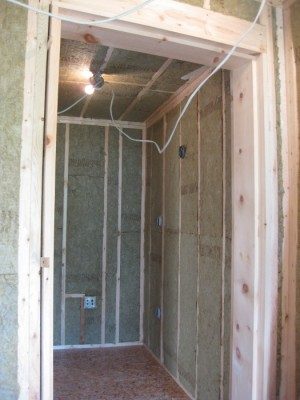
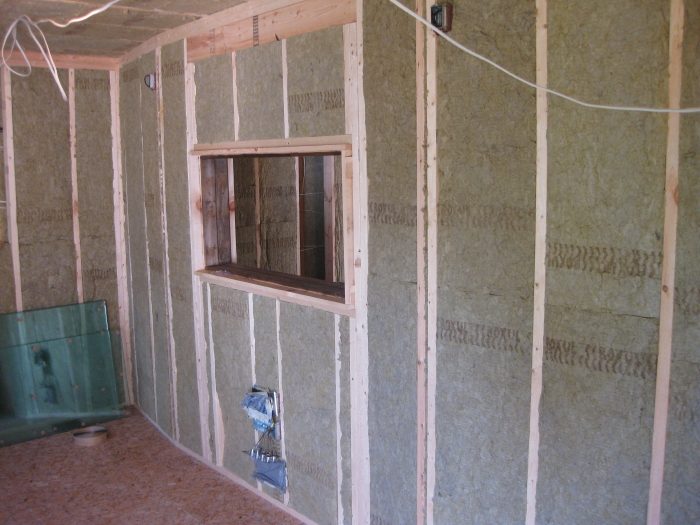
Some pics of insulation; You can see I added a couple outlets at the main monitor location
insulation1.jpg
insulation1.jpg
Image not preserved: insulation2.jpg
insulation4.jpg
insulation4.jpg
Image not preserved: insulation5.jpg
Image not preserved: insulation6.jpg
Image not preserved: insulation3.jpg
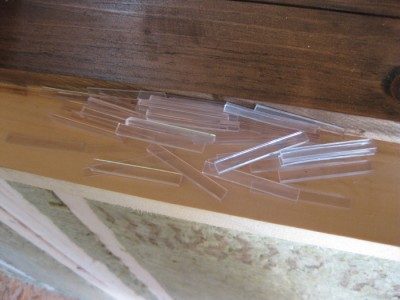
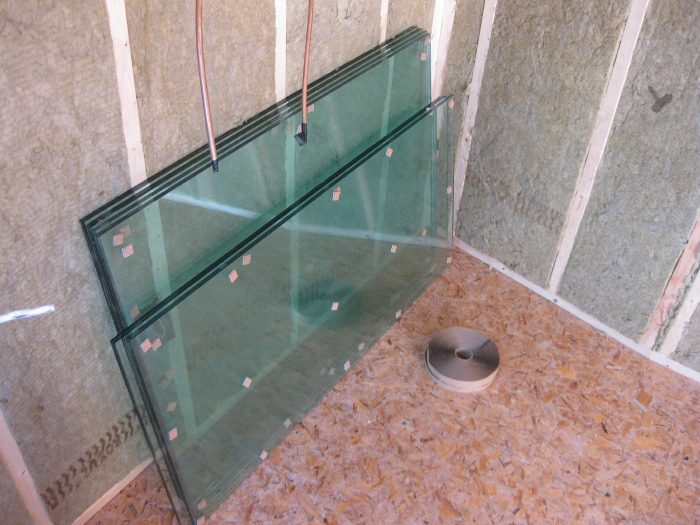
And the glass was delivered this morning. I picked up 150' of glazing tape from the same place I'm getting my sliding glass door. They threw in a handful of neoprene shims. Just got to get the 1/4-round trim stops and I'm ready to install. The glass looks green with the roxul behind it but its clear glass :wink:
neoprene_blocks.jpg
neoprene_blocks.jpg
glass&tape2.jpg
glass&tape2.jpg
very sweet ! Can't wait to see those babies get in place :)