 Just for kicks... Anyway, pick it apart, please!
Pick it apart, please!
Moderators: Aaronw, kendale, John Sayers
-
fierojoe
- Posts: 7
- Joined: Sat Jul 12, 2003 4:01 am
Pick it apart, please!
Hey all, I am working on a layout for my studio, so I took the SAE "The Big Facility" layout and customized it a little to fit inside a 40x60ft building with 14ft walls and a single pitch roof. There are a couple things I am wondering about in this layout. One of the things I changed was I put a double wall between Studio A and Studio B, but I am not aure about the 90* angle on the left wall of Studio A. Any accoustic no-nos here? Also, the area for my flush mount monitors. It looks like with this layout I am not going to have much room behind the monitor. I do not know how deep this area should be to properly trap bass. Any input you guys can give me would be great! Also, the huge open areas between rooms are sliding glass doors, I just didnt draw them in. While I am thinking of it, is there any layout programs that are good for studio layouts? I'd like to do a 3D Walkthrough too Just for kicks... Anyway, pick it apart, please!
Just for kicks... Anyway, pick it apart, please!-
knightfly
- Senior Member
- Posts: 6976
- Joined: Sun Mar 16, 2003 11:11 am
- Location: West Coast, USA
The 90 degree wall should be fine, you've only got a little bit of parallelism at the opposite end, which could be absorbed if it causes any flutter echo.
The soffits should be fine, you've got the area below for volume - however, they look kind of narrow to get the necessary baffle extension effect - does the window really need to be that wide? You'd be better off soffit-wise AND isolation wise, making it smaller.
On drawing programs - John and several others use Smart Draw, there's a link around here somewhere... I use an old DOS Cad program, which can output DXF files, then import it into Autodesk's QuickCad ($69.95)which I use only as a file translator (it can output JPEG's) I know it's kind of klunky to do it that way, but I'm addicted to using 95% of my screen space for drawing, instead of thousands of cutesy little icons. I may eventually give newer proggies a try, but I'm faster at drawing with the one I know. I also have a copy of Turbo Cad 8, with the included 3d floor plan module, $39.95 for both at Staples. It does NOT output any "raster" type formats, so you would need a file converter to post to the web. Both QuickCad and TurboCad utilize wheel mice, and TurboCad uses the wheel to zoom in/out on the current cursor location. Very cool.
I looked for the design info on soffit baffle size, came up empty. Has to do with lowest frequency wavelength but don't remember the rest. If I come across it later I'll re-post... Steve
The soffits should be fine, you've got the area below for volume - however, they look kind of narrow to get the necessary baffle extension effect - does the window really need to be that wide? You'd be better off soffit-wise AND isolation wise, making it smaller.
On drawing programs - John and several others use Smart Draw, there's a link around here somewhere... I use an old DOS Cad program, which can output DXF files, then import it into Autodesk's QuickCad ($69.95)which I use only as a file translator (it can output JPEG's) I know it's kind of klunky to do it that way, but I'm addicted to using 95% of my screen space for drawing, instead of thousands of cutesy little icons. I may eventually give newer proggies a try, but I'm faster at drawing with the one I know. I also have a copy of Turbo Cad 8, with the included 3d floor plan module, $39.95 for both at Staples. It does NOT output any "raster" type formats, so you would need a file converter to post to the web. Both QuickCad and TurboCad utilize wheel mice, and TurboCad uses the wheel to zoom in/out on the current cursor location. Very cool.
I looked for the design info on soffit baffle size, came up empty. Has to do with lowest frequency wavelength but don't remember the rest. If I come across it later I'll re-post... Steve
Soooo, when a Musician dies, do they hear the white noise at the end of the tunnel??!? Hmmmm...
-
fierojoe
- Posts: 7
- Joined: Sat Jul 12, 2003 4:01 am
Steve,
Thanks for the info, I'll do some looking for those programs. The one I posted as you could tell was all hand-drawn (eeek! Took a while). On the soffit baffle size, I am going to need to adjust the layout a little because to make the soffits deeper, it runs right into the corner of Studio B. How deep are they usually? I haven't even concidered monitors to put in there, but I am guessing those are a topic for another post. If I narrow up the bottom wall of Studio B, I can get rid of the 90* wall in Studio A, but then I'm pushing width for the sliding door. I guess I can make the room about a foot shorter. How far apart and how wide should the window be? I got all of these measurements off of the SAE site's "Big Facility". I just took what I thought to be a standard for one of the measurements and used that to scale everything else, so things may not be perfect, but the window on that layout seemed pretty big (I know that's bad). It also looks like the scan was a little sideways... Thanks so far for all your input!
Thanks for the info, I'll do some looking for those programs. The one I posted as you could tell was all hand-drawn (eeek! Took a while). On the soffit baffle size, I am going to need to adjust the layout a little because to make the soffits deeper, it runs right into the corner of Studio B. How deep are they usually? I haven't even concidered monitors to put in there, but I am guessing those are a topic for another post. If I narrow up the bottom wall of Studio B, I can get rid of the 90* wall in Studio A, but then I'm pushing width for the sliding door. I guess I can make the room about a foot shorter. How far apart and how wide should the window be? I got all of these measurements off of the SAE site's "Big Facility". I just took what I thought to be a standard for one of the measurements and used that to scale everything else, so things may not be perfect, but the window on that layout seemed pretty big (I know that's bad
). It also looks like the scan was a little sideways... Thanks so far for all your input!-
knightfly
- Senior Member
- Posts: 6976
- Joined: Sun Mar 16, 2003 11:11 am
- Location: West Coast, USA
The depth of soffits isn't critical, as they contribute nothing acoustically other than a place to mount your speakers. The speakers should be a relatively snug fit, unless you intend to try different speakers, in which case you should make the recesses big enough for the largest speaker you intend to use, and then make individual front baffle extensions for each speaker. The goal here is to make the speaker think that its front baffle has been extended, and we do that by having the front baffle of the speaker effectively one plane aligned with the wall.
As to using the lower and/or top areas for traps, you would just build the trap in, using the available dimensions and construction techniques found on the SAE site, here if you've not already found it -
http://www.saecollege.de/reference_material/index.html
Remember that baffle extensions should be as rigid as you can make them so they don't flex with low frequencies, and that, one way or another, the speakers should have a very narrow gap around them which is stuffed with insulation, and they should be exactly flush with the front edge of the soffit so that acoustically the entire front looks like one piece.
Speakers should, if possible, be set so that the midpoint between woofer and tweeter (unless it's a 3-way) are at ear level - if that's not possible, for example because you're using both soffited mains AND nearfields, then the non-ear-level speakers should be tilted so that the midpoint of the front baffle is PERPENDICULAR to a line drawn from that midpoint to the ear of the mix engineer. Keep in mind that doing this can introduce even MORE problems with early reflections, the geometry of this can be a real bitch.
Control room windows are a major pain - they are (acoustically) reflective right where you need absorption, they have glare right where you need to see, they compromise walls that need high isolation, they break when you "accidentally" throw a weighted mic stand at them, the right kind of glass costs a small fortune, especially with the mic stand thing... :=) In other words, a definite PITA. For this reason, IMO, the smaller the better. I could live with a 2' x 3' window and a couple of CCTV setups and be happy, but I'm kind of a mole when I'm creating. I would think that 3' x 5' should be the LARGEST window to consider, unless you've got a big SSL desk and just want ALL of it to reflect back to clients in a big window...
You don't need as much distance between the two glasses in a control room window as you've shown - if the distance between finish wall surfaces from tracking to control room is, say, 10 inches then that's plenty of air between glasses. So, if the glass to glass distance can be less, and the window can be smaller, then you've just gotten more area for soffit fronts...
Splaying the glasses is another argument - it's said that any gain in flutter control is lost in Transmission Loss because of decreased air space. About the only thing that's agreed on is the improvement in glare, which could theoretically be controlled by lighting design.
Glass thickness, in order to come as close as possible to wall performance, should be about 1/3 the thickness of total layers of wall paneling on each leaf, assuming sheet rock. You want roughly the same mass, and glass is about 3 times the weight of sheet rock.
BTW, you can download a free trial copy of smartdraw here -
http://www.smartdraw.com/
It obviously has limitations, or it wouldn't be free, but hey... Steve
As to using the lower and/or top areas for traps, you would just build the trap in, using the available dimensions and construction techniques found on the SAE site, here if you've not already found it -
http://www.saecollege.de/reference_material/index.html
Remember that baffle extensions should be as rigid as you can make them so they don't flex with low frequencies, and that, one way or another, the speakers should have a very narrow gap around them which is stuffed with insulation, and they should be exactly flush with the front edge of the soffit so that acoustically the entire front looks like one piece.
Speakers should, if possible, be set so that the midpoint between woofer and tweeter (unless it's a 3-way) are at ear level - if that's not possible, for example because you're using both soffited mains AND nearfields, then the non-ear-level speakers should be tilted so that the midpoint of the front baffle is PERPENDICULAR to a line drawn from that midpoint to the ear of the mix engineer. Keep in mind that doing this can introduce even MORE problems with early reflections, the geometry of this can be a real bitch.
Control room windows are a major pain - they are (acoustically) reflective right where you need absorption, they have glare right where you need to see, they compromise walls that need high isolation, they break when you "accidentally" throw a weighted mic stand at them, the right kind of glass costs a small fortune, especially with the mic stand thing... :=) In other words, a definite PITA. For this reason, IMO, the smaller the better. I could live with a 2' x 3' window and a couple of CCTV setups and be happy, but I'm kind of a mole when I'm creating. I would think that 3' x 5' should be the LARGEST window to consider, unless you've got a big SSL desk and just want ALL of it to reflect back to clients in a big window...
You don't need as much distance between the two glasses in a control room window as you've shown - if the distance between finish wall surfaces from tracking to control room is, say, 10 inches then that's plenty of air between glasses. So, if the glass to glass distance can be less, and the window can be smaller, then you've just gotten more area for soffit fronts...
Splaying the glasses is another argument - it's said that any gain in flutter control is lost in Transmission Loss because of decreased air space. About the only thing that's agreed on is the improvement in glare, which could theoretically be controlled by lighting design.
Glass thickness, in order to come as close as possible to wall performance, should be about 1/3 the thickness of total layers of wall paneling on each leaf, assuming sheet rock. You want roughly the same mass, and glass is about 3 times the weight of sheet rock.
BTW, you can download a free trial copy of smartdraw here -
http://www.smartdraw.com/
It obviously has limitations, or it wouldn't be free, but hey... Steve
Soooo, when a Musician dies, do they hear the white noise at the end of the tunnel??!? Hmmmm...
-
John Sayers
- Site Admin
- Posts: 5462
- Joined: Mon Jan 27, 2003 12:46 pm
- Location: Australia
- Contact:
That's a nice plan fierojoe - only initial comment is the splayed walls in the control room - with the space you have available I would splay them out to the full 12 degree offset.
The space is large enough to take maybe a smaller studio B as well - your workshop/kitchen/lounge/entry/storage/loading bay etc takes up a lot of floor space. Do you need all that??
cheers
john
The space is large enough to take maybe a smaller studio B as well - your workshop/kitchen/lounge/entry/storage/loading bay etc takes up a lot of floor space. Do you need all that??
cheers
john
-
fierojoe
- Posts: 7
- Joined: Sat Jul 12, 2003 4:01 am
John,
I admit, that is quite a bit of stuff. I know this though, when my band recorded our first CD (when we were young and GREEN), I walked into Prime-Time Studio, and I was sold... Just the look of the place sold me on it, even before I heard what the guy could do with it. If I have a potential client coming in and I can make him say "Wow" before I even turn on the monitors, Mucho brownie points to me! On top of all the other rooms on the right half of the building there will be a second story where I will actually reside (I can't leave my toys too far away from me before I get worried  ), so it's possible that I can move the work shop up-stairs and make a "Studio C", but I would do mostly drums and the rest scratch tracks, and I think that can be accomplished in 3 rooms, but you do bring up a good point to be considered... I have a copy of that file that has room dimension, I know my little cheesy |-| = 1ft doesn't give you a good idea of scale. It's bigger than you would want to put on the forums, but maybe I'll put it up on a page and ship out a link. Would you be interested?
I admit, that is quite a bit of stuff.
I know this though, when my band recorded our first CD (when we were young and GREEN), I walked into Prime-Time Studio, and I was sold... Just the look of the place sold me on it, even before I heard what the guy could do with it. If I have a potential client coming in and I can make him say "Wow" before I even turn on the monitors, Mucho brownie points to me! On top of all the other rooms on the right half of the building there will be a second story where I will actually reside (I can't leave my toys too far away from me before I get worried ), so it's possible that I can move the work shop up-stairs and make a "Studio C", but I would do mostly drums and the rest scratch tracks, and I think that can be accomplished in 3 rooms, but you do bring up a good point to be considered... I have a copy of that file that has room dimension, I know my little cheesy |-| = 1ft doesn't give you a good idea of scale. It's bigger than you would want to put on the forums, but maybe I'll put it up on a page and ship out a link. Would you be interested?-
John Sayers
- Site Admin
- Posts: 5462
- Joined: Mon Jan 27, 2003 12:46 pm
- Location: Australia
- Contact:
-
fierojoe
- Posts: 7
- Joined: Sat Jul 12, 2003 4:01 am
John,
I posted it up on one of my web sites, but the problem is that when I originally put the dimensions on the file, I made them small for printability. The graphic is 2460x1835 (about 96k) and the lettering is only 14pt, so if you re-size it the dimension will compress to small dots
http://www.fierojoe.com/studio_layout_dim.jpg
I can change it if you would like a version to post on the forum, but that's a little bit of work. I downloaded a free trial of Smart Draw, but I haven't done anything in it just yet.
I posted it up on one of my web sites, but the problem is that when I originally put the dimensions on the file, I made them small for printability. The graphic is 2460x1835 (about 96k) and the lettering is only 14pt, so if you re-size it the dimension will compress to small dots
http://www.fierojoe.com/studio_layout_dim.jpg
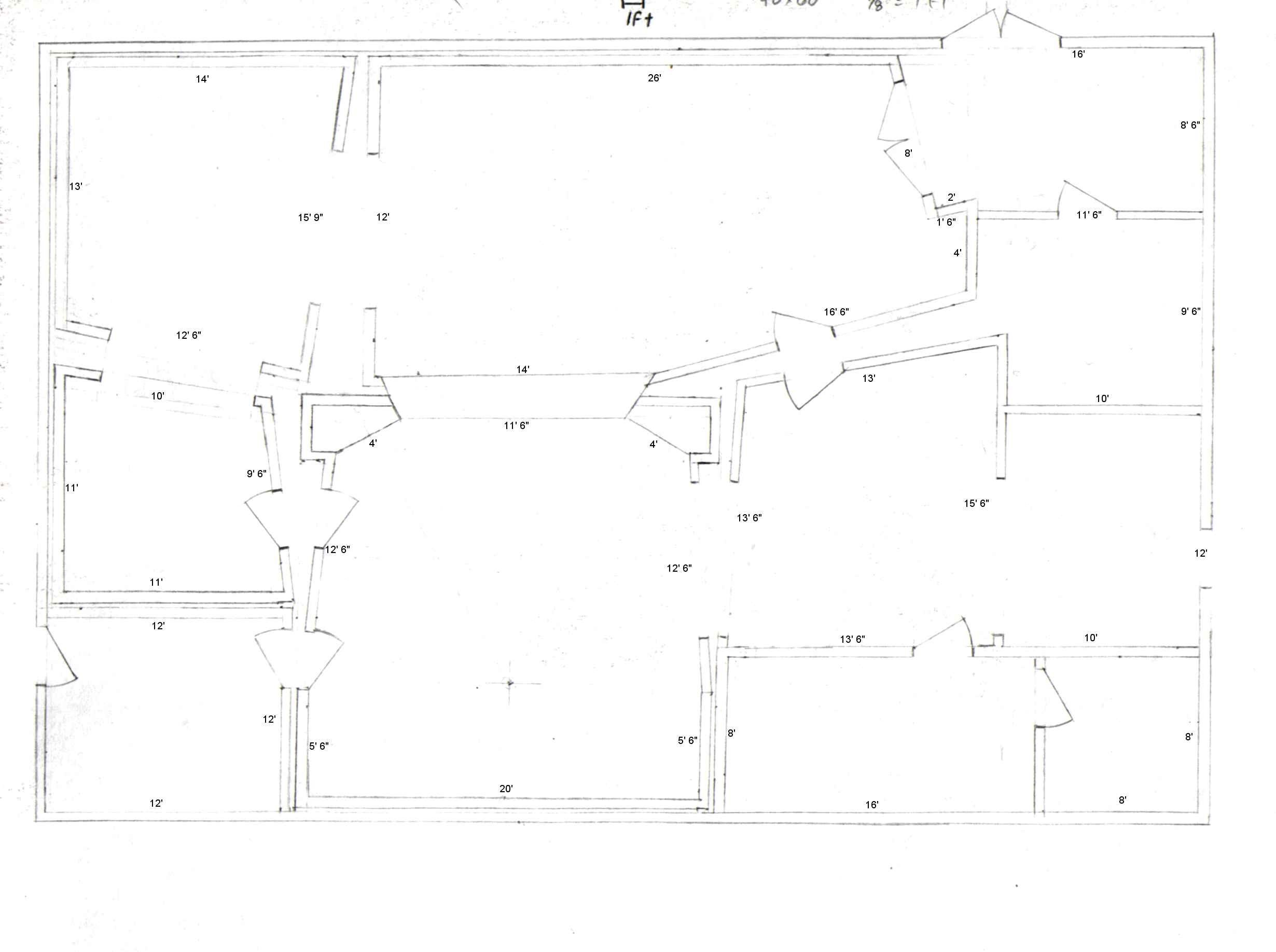
I can change it if you would like a version to post on the forum, but that's a little bit of work. I downloaded a free trial of Smart Draw, but I haven't done anything in it just yet.
-
giles117
- Senior Member
- Posts: 1476
- Joined: Sat Jun 21, 2003 2:42 am
- Location: Henderson County
- Contact:
-
John Sayers
- Site Admin
- Posts: 5462
- Joined: Mon Jan 27, 2003 12:46 pm
- Location: Australia
- Contact:
-
John Sayers
- Site Admin
- Posts: 5462
- Joined: Mon Jan 27, 2003 12:46 pm
- Location: Australia
- Contact:
-
fierojoe
- Posts: 7
- Joined: Sat Jul 12, 2003 4:01 am
John,
Wow! Very nice! I like the idea of the center channel and the rear speakers, but will that leave any room for a small piece of glass into Studio A? Also I am assuming the green block would be the racks, correct? Studio A may be wide, but it's not very deep. Will moving the control room to take a bit of it hurt? These plans can be adjusted to be in a slightly larger building if need be. The plans are for a new site, so I don't have any constraints besides the wallet and my bankers. Thanks a ton John and knightfly, you 'da man(men?)!
Wow! Very nice! I like the idea of the center channel and the rear speakers, but will that leave any room for a small piece of glass into Studio A? Also I am assuming the green block would be the racks, correct? Studio A may be wide, but it's not very deep. Will moving the control room to take a bit of it hurt? These plans can be adjusted to be in a slightly larger building if need be. The plans are for a new site, so I don't have any constraints besides the wallet and my bankers. Thanks a ton John and knightfly, you 'da man(men?)!
-
John Sayers
- Site Admin
- Posts: 5462
- Joined: Mon Jan 27, 2003 12:46 pm
- Location: Australia
- Contact:
-
John Sayers
- Site Admin
- Posts: 5462
- Joined: Mon Jan 27, 2003 12:46 pm
- Location: Australia
- Contact:
Ha Ha - yes it is pretty extensive glass work - well beyond your budget. I cut and pasted it from a major design I did last year. It requires the whole front section to be cantilevered from steel beams :) It's more the 5:1 layout I was depicting and the angled side walls with glass doors.
cheers
john
:) It's more the 5:1 layout I was depicting and the angled side walls with glass doors.cheers
john